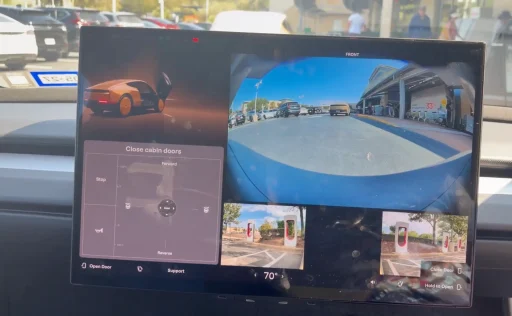

Tesla’s steering‑wheel‑free Cybercab appears to have a hidden manual drive panel on its central touchscreen, giving engineers a way to move the robotaxi at low speed using on‑screen controls for steering, throttle, braking, horn and doors.
The interface has been seen in videos from Austin and offers the first detailed look at how humans can reposition a vehicle that is otherwise designed to operate entirely on Tesla’s Full Self-Driving software.
What has been spotted
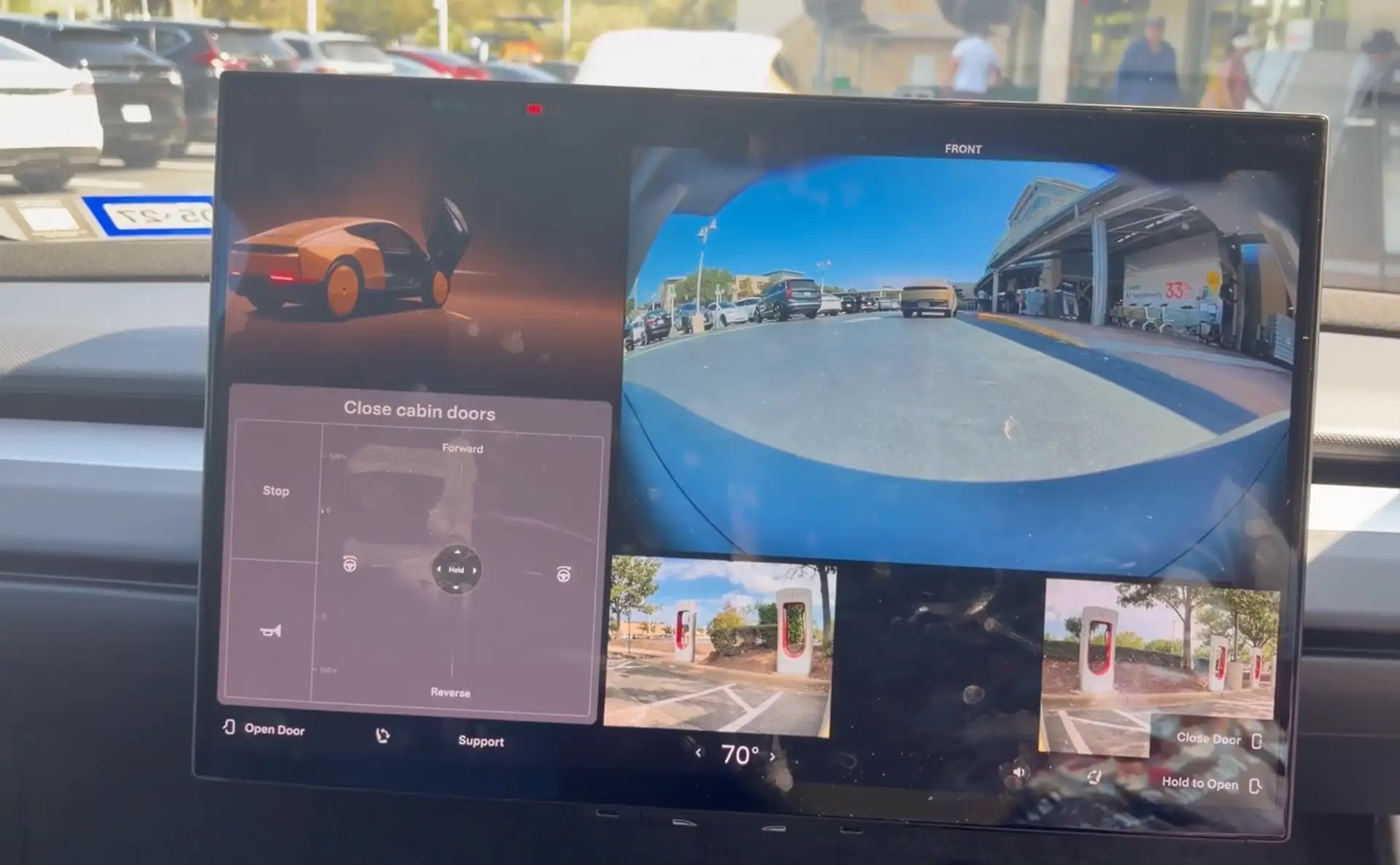
In one clip, recorded during an early Cybercab ride, a passenger says the vehicle briefly loaded a “virtual joystick” drive screen instead of the standard Robotaxi UI before their trip started. The video, published by X user Matthew, shows a circular joystick graphic on the left side of the display that responds to touch input, along with a row of manual buttons for brake, horn and closing the doors. The screen disappeared once the car reverted to its passenger interface, and the Cybercab did not move while the rider interacted with the controls, indicating that the system blocked drive commands from the unauthorized session.
Video:
Weird #cybercab situation! When I got in the vehicle, the display was in a different configuration with a virtual joystick for manual driving! I have a feeling I wasn’t supposed to see this… but I try to manually drive the vehicle anyway @wholemars @DirtyTesLa @DavidMoss… pic.twitter.com/mQsoDFDbEJ
— Matthew Skrzypczak (@MatthewSkrzypc1) September 7, 2026
A separate video from a Supercharger station in Austin shows a Tesla engineer using manual drive controls on the Cybercab’s center screen to fix a parking misalignment. After automated parking left the robotaxi too far from the charger for the cable to reach, the engineer sat inside, held down on‑screen directional buttons to pull the car forward, reposition it, and reverse back into a better spot.
Video:
I can confidently say I am the closest person from the public to being able to drive a Tesla Cyberca
— David Moss (@DavidMoss) September 8, 2026
So close yet so far
The vehicle arrived in some sort of mode I think it goes into at a supercharger for manual assistance
I couldn’t use any apps & the left repeater… pic.twitter.com/6lmWE6V8cT
How the manual UI works
The joystick handles both steering angle and motion, sliding up and down to control forward and reverse throttle, while sliding left and right turns the vehicle. Dedicated touch buttons next to the joystick apply the brake, honk the horn and close the cabin doors from the screen, giving staff the full set of basic maneuvering functions without any physical controls.
None of these elements are documented in Tesla’s public Cybercab rider guide, which limits passenger controls to doors, seats, climate, media and a pull‑over or support request, all accessed via the central display and the Robotaxi app. The guide explains how riders can touch “Open Door” and “Close Door” icons on the touchscreen, start a ride, adjust cabin temperature and entertainment, or ask the vehicle to pull over if they need to end the trip early. It does not mention any joystick, drive strip or manual steering mode.
Who can use these controls
Cybercab itself is built as a two‑seat robotaxi with no steering wheel, no accelerator and no brake pedal, reflecting Tesla’s goal of a fully autonomous service operated by its FSD stack in geofenced areas of Austin. With passengers given no hardware through which to intervene, service technicians, emergency personnel and factory workers still need a way to move the car during maintenance or when software makes a mistake in tight spaces. The hidden touchscreen drive panel appears to answer that need, allowing carefully controlled human maneuvers while keeping the interior free of traditional driving controls.
Tesla has not commented publicly on the manual drive footage. The on‑screen joystick and directional buttons stand as a glimpse behind the scenes of Tesla’s robotaxi architecture, a backup interface that ensures a car with no steering wheel and pedals can still be moved by human hands when autonomy is not enough.
We’ve launched an official Tesla Owners Online Forum. Join early and claim your "Founding Fuel" badge.