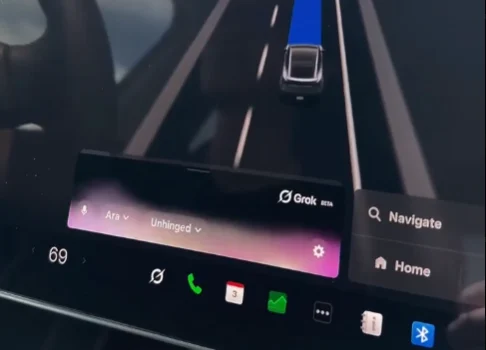

Tesla has activated Grok Bot in its vehicles, giving eligible owners a way to manage digital tasks through the existing Grok Voice interface. Drivers can use voice requests for email, calendars, online orders, reservations and connected work tools without opening a separate Tesla app.
For now, the feature is limited to SuperGrok Heavy subscribers. Tesla and xAI plan to extend access to more subscription tiers later, according to early reports on the rollout.
Grok Bot comes to the cabin
The new feature brings Grok Bot into Tesla’s in-car voice system. Users can ask the agent to handle a multi-step request, then continue their trip as the task runs through linked services.
Grok Bot differs from the earlier Grok assistant in Tesla vehicles. The first version focused on conversation, questions and basic voice help, but Grok Bot can work across connected accounts and services after a user gives it a task.
Tesla owners do not need to install a new vehicle app. The agent lives inside the Grok Voice interface already available in supported cars.
Grok Bot in action: Video
Grok Bot has just officially launched in @Tesla vehicles.
— Sawyer Merritt (@SawyerMerritt) September 22, 2026
I got early access a couple weeks ago. You can order stuff on online (such as Amazon), manage your email, calendar, finances, or other tasks through Grok @Bot using just your voice in your Tesla.
There is no separate… pic.twitter.com/Jg60oXiPvC
Email, calendars and files
Grok Bot can connect with services such as Gmail, Google Calendar, Google Drive, Outlook, OneDrive, Slack and Notion. Users can ask it to sort an inbox, review a calendar, summarize files or prepare a task list through voice commands.
For example, a driver could ask Grok Bot to review the day’s appointments, clear lower-priority emails or talk through a document before arriving at work. The system can return a spoken summary inside the car, which may be useful during a commute.
Video
.@Grok in your Tesla can now do meaningful work for you
— Tesla (@Tesla) September 22, 2026
With Connectors, you can manage your inbox, clean up your calendar, or talk through existing files/chat/tasks – all hands-free pic.twitter.com/W1LuybQh0P
At the same time, people still need to review any email, booking or payment before relying on the outcome. AI agents can misunderstand requests, and account access creates privacy and security risks.
Ordering coffee and reservations
Online ordering is one of the first public use cases for Grok Bot in Tesla vehicles. The agent can work with connected ordering and reservation services, including food delivery platforms, restaurant bookings and online shopping tools.
A driver could get into a Tesla, ask Grok Bot to order coffee from a chosen location, then travel there using FSD (Supervised) as the order is placed. By the time the car arrives, the coffee could be ready for pickup.
The same system could help book a table, place a food order or buy an item from a website. Still, Tesla has not published a full list of every service available in every market.
Connectors expand what it can do
Grok Bot relies on connectors, which link the AI agent to a user’s accounts and online services. These links can give the agent access to inboxes, calendars, cloud files, social feeds, work platforms and payment tools.
Available integrations include Google services, Microsoft services, GitHub, Slack, Notion, CRM platforms and Stripe Link. Some reports describe agentic web browsing too, allowing Grok Bot to complete a purchase through a regular website when a direct connector is unavailable.
Then there is the cloud component. Grok Bot operates through a dedicated cloud computer, allowing tasks to continue after a user leaves the vehicle or closes the app.
Who can use it now
Grok Bot access in Tesla is currently reserved for SuperGrok Heavy users. SuperGrok Heavy is xAI’s top consumer tier and has been listed at $300 per month in recent pricing coverage.
Tesla hardware is another limit. Grok’s advanced in-car features require an AMD Ryzen infotainment computer, leaving many older Intel Atom-based vehicles outside the supported group.
Tesla’s existing Grok support information states that the feature requires Premium Connectivity or Wi-Fi. Vehicle software also needs to be current enough to support Grok, with newer voice functions tied to the 2026.26 software branch and later releases.
However, an older Tesla with Intel-based infotainment hardware is unlikely to receive the same full Grok Bot experience.
A broader role for Grok
Tesla first brought Grok to eligible vehicles in 2025 as a conversational assistant from xAI. At that stage, it could answer questions and support a range of voice interactions, though its role inside the vehicle was limited.
Tesla later widened Grok’s in-car functions through its 2026 Summer Update. Owners with supported hardware could use voice commands for climate settings, media, glovebox access, navigation and certain other vehicle controls.
Grok Bot now adds work and commerce tasks to that setup. A Tesla owner can speak to one interface for vehicle functions, messages, schedules, files, orders and account-linked tasks.
Privacy and review controls
Tesla’s Grok support pages state that in-car Grok conversations are handled under xAI’s privacy policy. Tesla says the conversations are anonymous to the automaker, though users should still consider the account permissions granted through each connector.
“Interactions with Grok are securely processed by SpaceXAI in line with their privacy notice. Conversations remain anonymous to Tesla and are not linked to you or your vehicle. When you ask Grok to call someone, Grok will access your phone contacts in the vehicle before placing the call; your contacts are not sent to SpaceXAI. Location-related features require you to opt in to ‘Share precise location.’ View our Privacy Notice for additional information.”
Grok Bot includes options for human review before certain actions, including sending emails, booking travel or making payments. Those controls are useful when an agent is working with personal data or making a purchase after a voice request.
Still, users should check completed actions and avoid placing sensitive decisions entirely in the hands of the agent. This is particularly relevant for financial transactions, business communications and account changes.
We’ve launched an official Tesla Owners Online Forum. Join early and claim your "Founding Fuel" badge.